Navigating Web Documentation
How to Navigate this documentation:
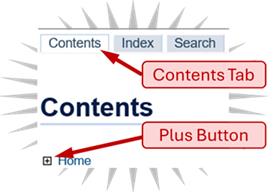
- The "Contents" tab in the left column, lists the table of contents, which has links to the sections in the documentation.
- To see sub-sections in the contents, use the "+" (Plus Button) and "-" button to expand and hide sub-sections.
- The "Index" tab, alphabetically lists terms and the document sections, with links to these items.
- The "Search" tab, provides a way to find text in the documentation. A search returns a link to the text and a snippet of the text.
- The main panel on the right, presents the text and graphics. It may also include links to other related sections of the document.
- In this panel, the "nextTopic" and "previousTopic" links, can be used to jump to the next and prior sections.
- There is a reference number at the bottom right of the panel, e.g. "Book: 11111 Topic: 22222" (you may need to scroll down to see it), this identifies the content you are viewing. Please quote this, in any communication with AAMVA.
- Some links open a Pop-up box. To close the box, click the link again, or click the "X" in the top right corner of the box.
- If you need to go back to a previous topic, use the browser's back button.
|
AAMVA.org Who is AAMVA Contact AAMVA (helpdesk@aamva.org) System Availability |
AAMVA Terms of Service AAMVA - Official Use Only 2/18/2026 © AAMVA. All rights reserved. Book: 56261 Topic: 65385 |